
Stop using AI as a chatbot

So many products over the last few years have tacked on AI as an afterthought, usually just as a chatbot on the side, without considering ways it can be implemented deeper into the product. AI is most useful when it disappears into the product—a skill which is hard to master.
I've recently been working on a tool called Rhythm - a smart calendar that schedules your to-dos for you. This blog post will cover the lessons I learned when building Rhythm.
How Rhythm uses AI
The core idea behind Rhythm is movable to-dos. But because the tool is for power users, it needs to be quick to spam in your tasks at the start of the day.
This is where AI becomes really useful: utilizing natural language processing to convert that messy human input into an actual, structured task.

This makes it really easy to spam in stuff like:
- finish biology notes by tuesday
- respond to james 5m
- wash the dishes
and have Rhythm schedule it automatically.
Integrating LLMs this deeply into apps almost makes them disappear, feeling like a seamless experience designed around the AI.
Traditional code that feels intelligent
AI isn't always necessary, either! In many cases where AI comes to mind first, traditional code can actually complete the same task more consistently.
For example, Rhythm's scheduling engine—the bit of code that actually schedules to-dos—isn't AI. It's traditional code with constraints and logic. Because it's designed like that, it's far more customizable, and will produce a similar, rational result every time. Not only that, but it's also far faster.
The engine splits up the day into 5-minute segments, looping through and checking if it meets the necessary criteria and settings such as:
- Work hours
- Breaks between tasks
- Preferred energy period (night-owls/early-birds)
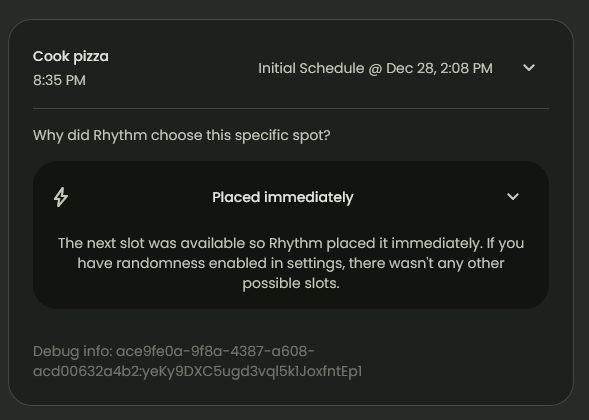
It schedules in passes. First it tries to find a slot that respects everything: working hours, breaks, energy preference, and maximum consecutive work. If nothing fits, it relaxes rules in a deliberate order. It might ignore low-energy windows, then (optionally) bypass the max-stretch rule, and finally expand into a small “fluctuation allowance” outside work hours. That ordering is intentional: Rhythm should only violate preferences when it has to, and it should be obvious which rule was bent.
That means Rhythm can show why it moved something, instead of just moving it.
The real lesson
The point isn’t “AI bad” or “traditional code good”. It’s that AI is best at handling ambiguity (messy human input), and traditional code is best at enforcing constraints (consistent scheduling).
If you treat AI as a UI (a chatbot), you often end up making the user do more work. If you treat AI as infrastructure, it can remove friction and disappear into the product.
Building Rhythm taught me that “smart” doesn’t have to mean probabilistic. A deterministic engine with clear rules can feel more intelligent than an AI system if it’s predictable, fast, and explainable.
Feel free to check out Rhythm here - it's now available for all users! https://rhythm.to